Hexpad

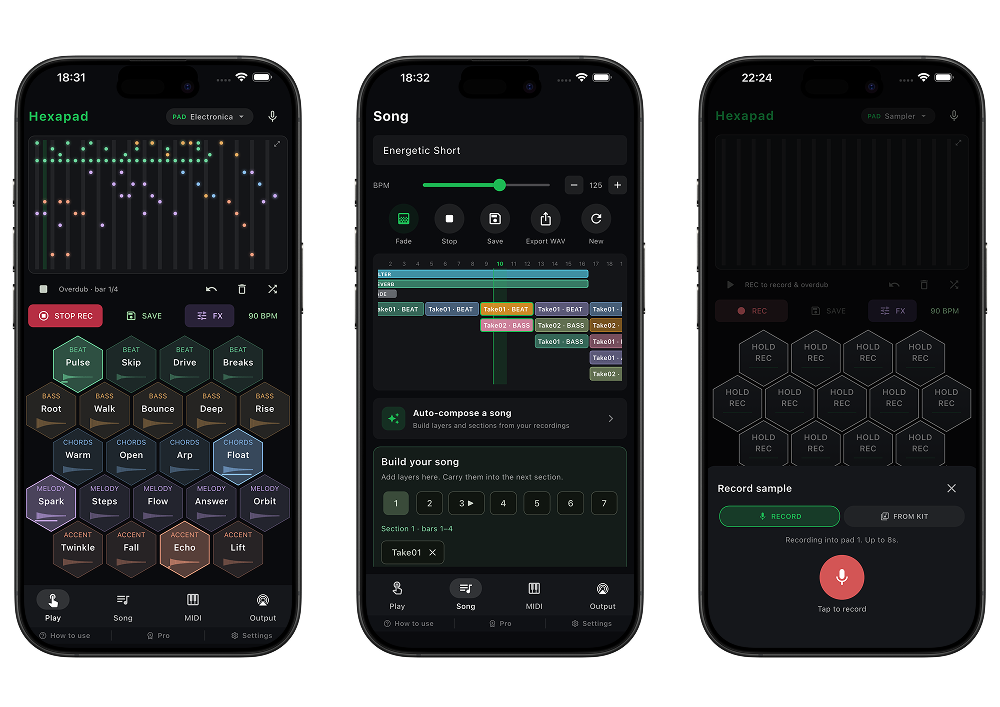
Hexapad は、六角形のパッドをハニカム状に並べた、指の動きが自然に流れる新感覚のビートメーカー/ステップシーケンサーです。

追加サンプルは不要。内蔵シンセだけで、Techno・House・Hip-Hop・Ambient・Lo-Fi・Minimal・IDM・Alternative・Contemporary まで、多彩なジャンルを網羅しています。マイク録音専用キットを使えば、録った音をそのままパッドに追加可能。録音した音は自動で音量を整えるので、他の音源と並べても自然に馴染みます。各パッドには鳴らす音の波形が表示され、ひと目で音の輪郭がつかめます。

各キットは、ビートだけでなくメロディ・ベースとしても演奏できます。ヘッダーのモード切り替えひとつで、リズムから旋律・低音ラインまで指先で奏でられます。メロディ・ベースの音色やキーはキットごとに作り分けられており、たとえば Contemporary ではフェルトピアノが、ジャンルに応じた音と調で響きます。モードは色で区別され(ビート=緑、メロディ=青、ベース=橙)、画面上でも直感的に切り替えられます。

各キットには、リバーブ・エコー・フランジャーなど独自のエフェクト設定を搭載。音の質感をキットごとに作り込めます。サイレントモードでも音が鳴るので、ヘッドホンがなくても、どこでも制作に集中できます。

タップしてビートを刻み、保存してループを重ねる。Demo や Band ボタンを押せば、ビート+メロディ+ベースの一式をワンタップで自動生成し、その場で重ねて鳴らせます。気に入ったループは Save で保存。保存した音を組み合わせ、フェードイン/アウトを付けて、WAV 形式で書き出すこともできます。

「曲をつくる」体験を、手のひらの上で直感的にお楽しみください。

Hexapad is a beatmaker and step sequencer with a fresh, intuitive feel — hexagonal pads laid out in a honeycomb grid that let your fingers move naturally.

No extra samples needed. The built-in synths alone cover a wide range of genres — Techno, House, Hip-Hop, Ambient, Lo-Fi, Minimal, IDM, Alternative, and Contemporary. With the dedicated mic-recording kit, you can capture your own sounds and drop them straight onto the pads. Recorded audio is auto-leveled, so it sits naturally alongside everything else. Each pad displays the waveform of its sound, giving you the shape of the tone at a glance.

Every kit plays as more than just beats — it works for melodies and basslines too. A single mode switch in the header takes you from rhythm to melody to bass, all at your fingertips. The melody and bass tones and keys are crafted per kit — in Contemporary, for example, a felt piano resonates with a sound and key suited to the genre. Modes are color-coded for intuitive switching (beat = green, melody = blue, bass = orange).

Each kit comes with its own effects setup — reverb, echo, flanger, and more — so you can shape the texture of every kit. Sound plays even in silent mode, so you can create anywhere, with or without headphones.

Tap to lay down a beat, save it, and layer your loops. Hit the Demo or Band button to auto-generate a full set of beat, melody, and bass in a single tap, then layer them on the spot. Save the loops you like, combine your saved sounds, add fade-in/out, and export to WAV.

Enjoy the experience of making music — intuitively, right in the palm of your hand.

このページではアプリのサポートを提供しています。

ご質問やバグレポートがございましたら、下記よりお問い合わせください。迅速に対応させていただきます。

お問い合わせ

This page provides App support.

If you have any questions or bug reports, please contact us using the form below. We will respond as quickly as possible.

Contact

Best.

SCROLL